Maintenance
Cinchy can perform maintenance tasks such as data erasure and data compression deletions.
Kubernetes
The following section pertains to customers on Kubernetes.
Prerequisites
- View and edit access to the
[Cinchy].[System Properties]table. - View access to the
[Cinchy].[Event Log]table.
Maintenance
- To turn on the maintenance capability, navigate to the
[Cinchy].[System Properties]table. - In the "Maintenance Enabled" row, set the
Valuecolumn to1.
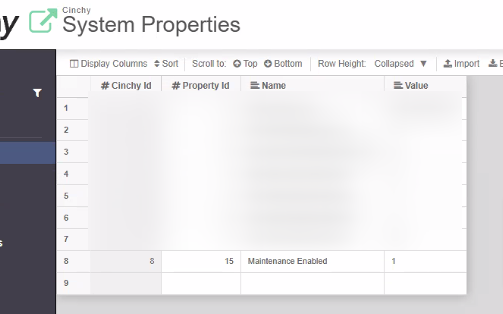
- Maintenance tasks will run automatically in the background. To track when tasks are running, use the
[Cinchy].[Event Log]table.
Scheduled maintenance on Kubernetes
Maintenance runs nightly as a Kubernetes CronJob. The default schedule is 02:00 UTC.
The schedule and its bounds are per-instance settings, under cinchy_instance_configs.<instance>.scaling_parameters.maintenance_cli in azure.json or aws.json. All are optional.
| Setting | Default | Notes |
|---|---|---|
maintenance_cli_schedule | 0 2 * * * | Cron expression. |
maintenance_cli_time_zone | Etc/UTC | Requires Kubernetes 1.27 or later. |
maintenance_cli_timeout_minutes | 30 | The maintenance time window. |
maintenance_cli_active_deadline_seconds | 2400 | Backstop that terminates the Job. Must exceed the timeout above. |
maintenance_cli_observability_retention_days | 90 | Health snapshot retention, 1 to 365. |
The schedule previously lived in the shared base, so every instance on a cluster fired at the same instant. Now that it is per-instance, give each one a different time.
A run that reaches its time window stops cleanly and is recorded as a success: the window is a budget, not a failure condition. The Execution Output reports how far it got, which table was in flight, and an estimate of the time remaining.
Observability maintenance
Each nightly run refreshes the Observability dashboard before it does anything else: it recalculates baseline metrics and health snapshots, prunes snapshots past their retention window, and resets the event listener counters. Running first means a tight maintenance window cannot starve it, and a failure here does not abort the rest of the run.
Two flags control it:
| Flag | Value |
|---|---|
--no-observability | Skip the Observability step entirely. |
--observability-retention-days | Days of health snapshots to retain. Default 90, must be between 1 and 365. |
System tables
Maintenance can run on the [Cinchy] domain tables that hold operational log, history and cached state. Every other system table is refused, by both the API and the Design Table screen.
Eligible tables:
Comments, Data Sync Configurations, Listener Config, Event Log, Execution Errors, Execution Log, User Grants, User Login Attempts, Observability Health Snapshots, Observability Baseline Metrics, Automations, Automation Execution History, Automation Steps Execution History.
[Cinchy].[Files] and [Cinchy].[Automation Steps] are deliberately excluded. Files has its own erasure path that removes the blob from object storage before the row, and a second path would orphan storage. Automation Steps carries a Code Bundle file link, and erasure collects a table's file references without checking whether another live row still uses the same file, so erasing a deleted step could take a Code Bundle a surviving step depends on.
Nothing changes until you set a retention policy on a table. Before you set one:
- Erasure only reclaims rows that were already deleted. "Permanently erase records deleted more than N days ago" acts on the recycle bin. Setting it on
[Cinchy].[Execution Log]does nothing until rows are deleted, by hand or by a scheduled query.[Cinchy].[User Grants]is the exception: expired tokens are already soft-deleted by the platform and have never been reaped, so erasure reclaims space there immediately. - Enabling compression builds indexes. Turning on version retention creates two indexes on the table's history. On a large history table that is a real index build, so do it in a maintenance window.
- Respect the foreign keys. Delete
[Cinchy].[Execution Errors]rows before or alongside[Cinchy].[Execution Log], and[Cinchy].[Automation Steps Execution History]before[Cinchy].[Automation Execution History]. - Check what reads the Automations history tables. The Email Notification Service and the automation concurrency gate both query them. All filter by recency, so a sane retention window is fine, but an aggressive one is not.
Maintenance has stopped running
On Kubernetes, a maintenance Job that never completes blocks every later run. The CronJob uses concurrencyPolicy: Forbid, so every later schedule is skipped for as long as that Job exists, with no event, no alert and nothing in any log.
Your environment is affected if either of these is true:
- A maintenance-cli Job has an active pod.
[Cinchy].[Execution Log]has a row with[Command] = 'Maintenance'stuck at[State] = 'Running'.
A hung Job has to be deleted by hand. Upgrading does not clear one:
kubectl -n <namespace> get jobs -l app=maintenance-cli
kubectl -n <namespace> delete job <hung-job-name>
Add --cascade=foreground if the pod lingers. maintenance_cli_active_deadline_seconds applies only to Jobs created after you set it, because Kubernetes copies it into a Job when the Job is created. Argo CD cannot clear one either: a Job the CronJob controller generated is not part of the rendered manifest set.
IIS
The following section pertains to customers on IIS.
Prerequisites
- Requires CLI v4.7+
- View and edit access to the
[Cinchy].[System Properties]table.
Maintenance
Cinchy performs maintenance tasks through the CLI. This currently includes the data erasure and data compression deletions.
-
- To turn on the maintenance capability, navigate to the
[Cinchy].[System Properties]table.
- To turn on the maintenance capability, navigate to the
- In the "Maintenance Enabled" row, set the
Valuecolumn to1.
- Open a command line/terminal as an administrator and run the following, using the below table as a guide:
Cinchy.Maintenance.CLI.exe maintenance -s "cinchyBaseURL" -u username -p "encryptedPassword" -t 180
| Parameter | Value |
|---|---|
| -s | Server, Cinchy Base URL (ex. cinchy.com/Cinchy/) |
| -u | Username, this will need to be an account that's part of the Cinchy Administrators group |
| -p | Encrypted password (you can encrypt your password by using Cinchy.CLI.exe encrypt -t "plaintextpassword") |
| -t | Set a maintenance time window in minutes. Maintenance tasks will stop executing after the allotted time. Run this during an allotted maintenance window. |
| -h | You must add this flag if you are accessing Cinchy over HTTPS. |
--no-observability | Skip the Observability maintenance step. |
--observability-retention-days | Days of Observability health snapshots to retain. Default 90, must be between 1 and 365. |