Custom node results
Custom results in the Network Map
Focus the results of your Network Map to show only the data that you really want to see with our new URL parameters.
Configure Data Network Visualizer parameters in URL
To customize the Data Network Visualizer, you can add the Target Node, Depth Level, and Max Depth Level parameters to the base URL.
URL structure
The base URL structure is as follows:
<base url>/apps/datanetworkvisualizer?targetNode=&maxDepth=&depthLevel=
Parameter descriptions
-
Target node: Specifies the central node from which all connections branch out.
- Use the TableID number, found in the URL of any table.
- Example:
<base url>/apps/datanetworkvisualizer?targetNode=8centers the visualization on TableID 8.
-
Max depths: Determines the number of network hierarchy levels to display.
- Example:
<base url>/apps/datanetworkvisualizer?maxDepth=2displays up to two levels of connections.
- Example:
-
Depth level: Highlights a certain depth of connections in the UI.
- Example:
<base url>/apps/datanetworkvisualizer?DepthLevel=1highlights all first-level connections, muting the rest.
- Example:
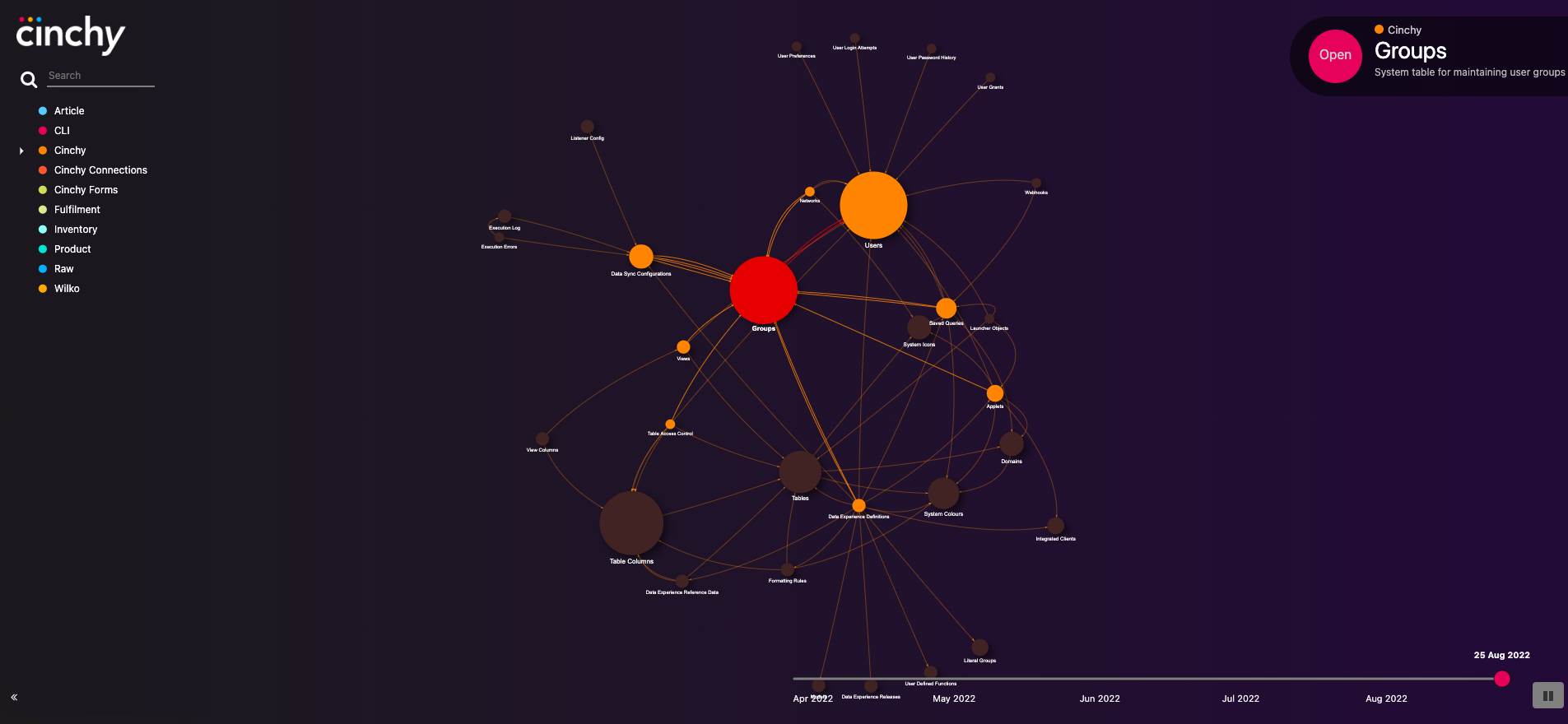
The below example visualizer uses the following URL: <base url>/apps/datanetworkvisualizer?targetNode=8\&maxDepth=2\&depthLevel=1
- It shows Table ID 8 ("Groups") as the central node.
- It only displays the Max Depth of 2 connections from the central node.
- It highlights the nodes that have a Depth Level of 1 from the central node.