Ranking functions
Overview
Ranking functions return a ranking value for each row in a partition.
The ranking functions covered in this section are:
The clauses covered in this section are:
DENSE_RANK
DENSE_RANK returns the rank of each row within a result set partition, with no gaps in the ranking values. The rank of a specific row is one plus the number of distinct rank values that come before that specific row.
Return Type
Bigint
Syntax
DENSE_RANK() OVER (PARTITION BY column1 ORDER BY sort_column1)
Arguments
| Argument | Description | Example |
|---|---|---|
OVER | Determines the partitioning and ordering of a rowset before the associated window function is applied. See here for further information. | |
PARTITION BY | This optional clause divides the result set into partitions or groups, and the ranking is applied within each partition separately. If omitted, the entire result set is treated as a single partition. | Department |
ORDER BY | Specifies the columns by which the data is sorted to determine the ranking order. | Salary |
Example 1
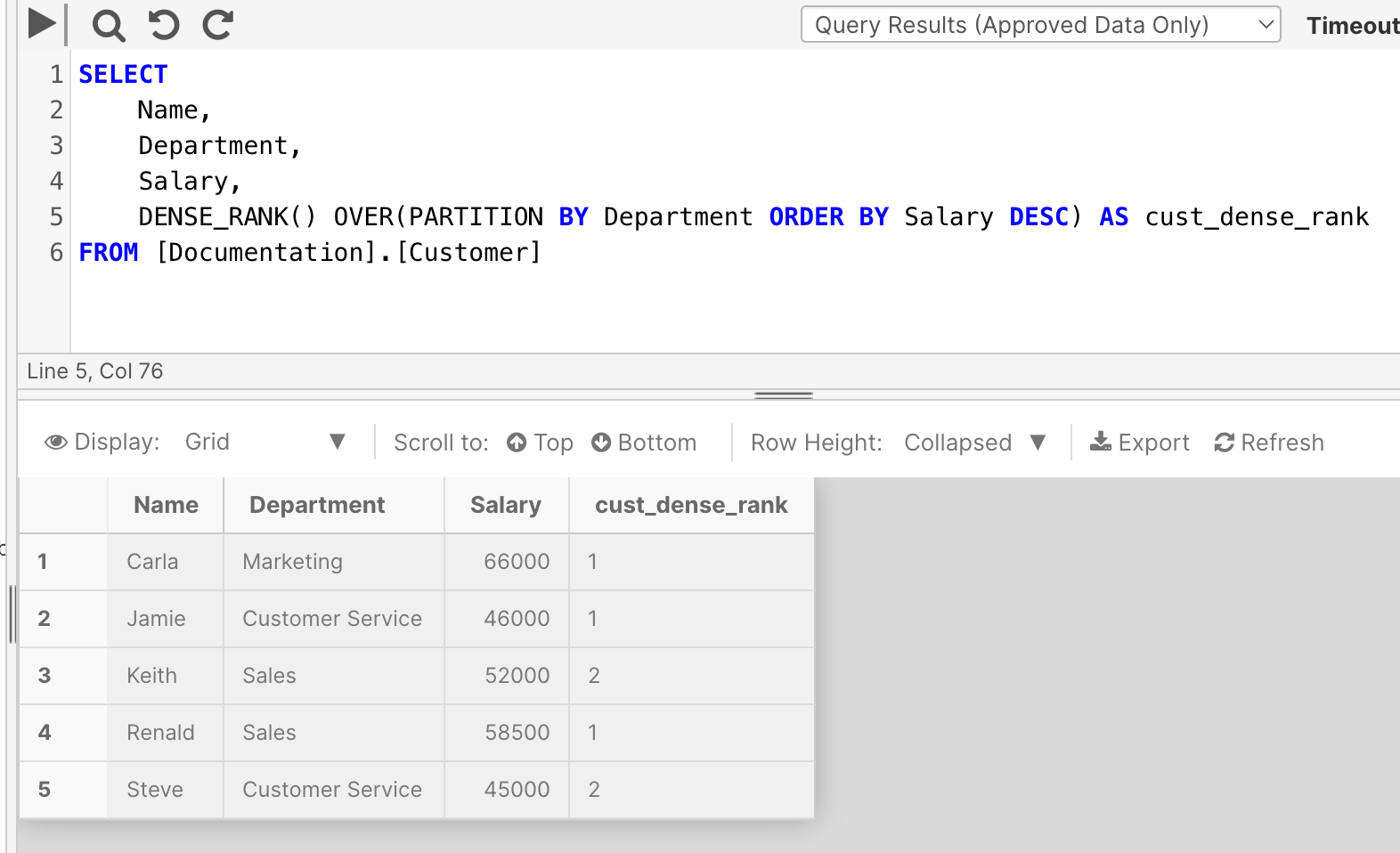
This example returns dense rank of customers in the [Documentation].[Customer] table, ordered by salary, within each department.
For example, it ranks Renald and Keith as the number one and number two ranked salaries in the Sales department respectively.
SELECT
    Name,
    Department,
    Salary,
    DENSE_RANK() OVER(PARTITION BY Department ORDER BY Salary DESC) AS cust_dense_rank
FROM [Documentation].[Customer]
NTILE
NTILE distributes the rows in an ordered partition into a specified number of groups. The groups are numbered, starting at one. For each row, NTILE returns the number of the group to which the row belongs.
Return Type
Bigint
Syntax
NTILE(expression) OVER (PARTITION BY column1 ORDER BY sort_column1)
Arguments
| Argument | Description | Example |
|---|---|---|
expression | A positive integer expression for dividing rows into groups. | 2 |
OVER | Determines the partitioning and ordering of a rowset before the associated window function is applied. See here for further information. | |
PARTITION BY | This optional clause divides the result set into partitions to which the function is applied. | Department |
ORDER BY | Determines the order in which the NTILE values are assigned to the rows in a partition. | Salary |
Example
This example takes data from the [Documentation].[Customers] table and:
- Partitions it by department
- Orders it by Name
- And divides it into 2 groups based on the NTILE expression.
SELECT
    Name,
    Department,
    NTILE(2) OVER(PARTITION BY Department ORDER BY Name DESC) AS ntile_groups
FROM [Documentation].[Customer]
PERCENT_RANK
PERCENT_RANK calculates the relative rank of a row within a group of rows. Use PERCENT_RANK to evaluate the relative standing of a value within a query result set or partition. It will return values between 0 and 1 to determine relative ranking.
Return Type
float
Syntax
PERCENT_RANK( ) OVER (PARTITION BY column1 ORDER BY sort_column1)
Arguments
| Argument | Description | Example |
|---|---|---|
OVER | Determines the partitioning and ordering of a rowset before the associated window function is applied. See here for further information. | |
PARTITION BY | This optional clause divides the result set into partitions to which the function is applied. | |
ORDER BY | Determines the logical order in which the operation is performed. | Salary |
Example
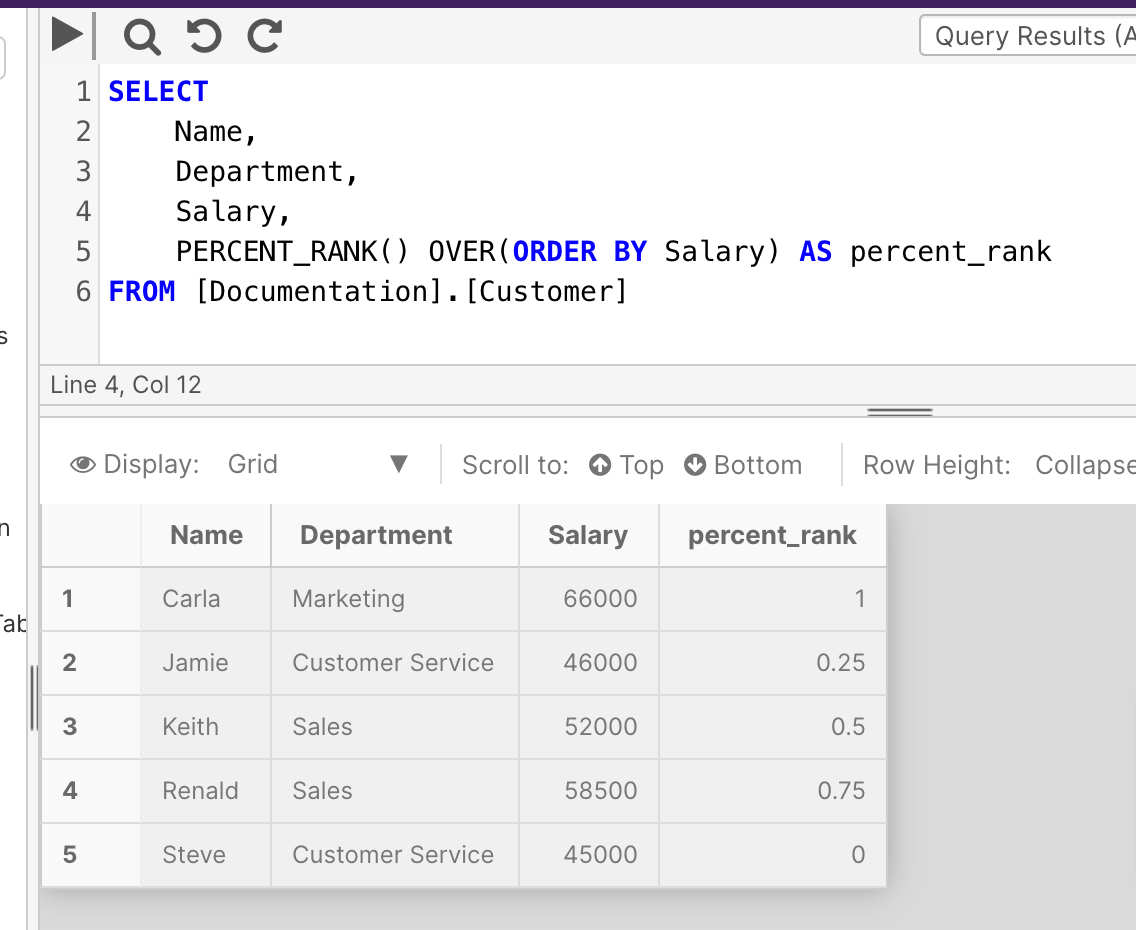
This example ranks data from the Salary column of the [Documentation].[Customer] table. The results show that Carla has the highest rank of 1, with a 66,000$ salary, while Steve has the lowest rank of 0, with a 45,000$ salary.
SELECT
    Name,
    Department,
    PERCENT_RANK() OVER(ORDER BY Salary) AS percent_rank
FROM [Documentation].[Customer]
RANK
RANK returns the rank of each row within a result set partition. The rank of a specific row is one plus the number of distinct rank values that come before that specific row.
Return Type
Bigint
Syntax
RANK() OVER (PARTITION BY column1 ORDER BY sort_column1)
Arguments
| Argument | Description | Example |
|---|---|---|
OVER | Determines the partitioning and ordering of a rowset before the associated window function is applied. See here for further information. | |
PARTITION BY | This optional clause divides the result set into partitions or groups, and the ranking is applied within each partition separately. If omitted, the entire result set is treated as a single partition. | Department |
ORDER BY | Specifies the columns by which the data is sorted to determine the ranking order. | Salary |
Example
This example returns rank of customers in the [Documentation].[Customer] table, ordered by salary, within each department.
SELECT
    Name,
    Department,
    Salary,
    RANK() OVER(PARTITION BY Department ORDER BY Salary DESC) AS cust_rank
FROM [Documentation].[Customer]
ROW_NUMBER
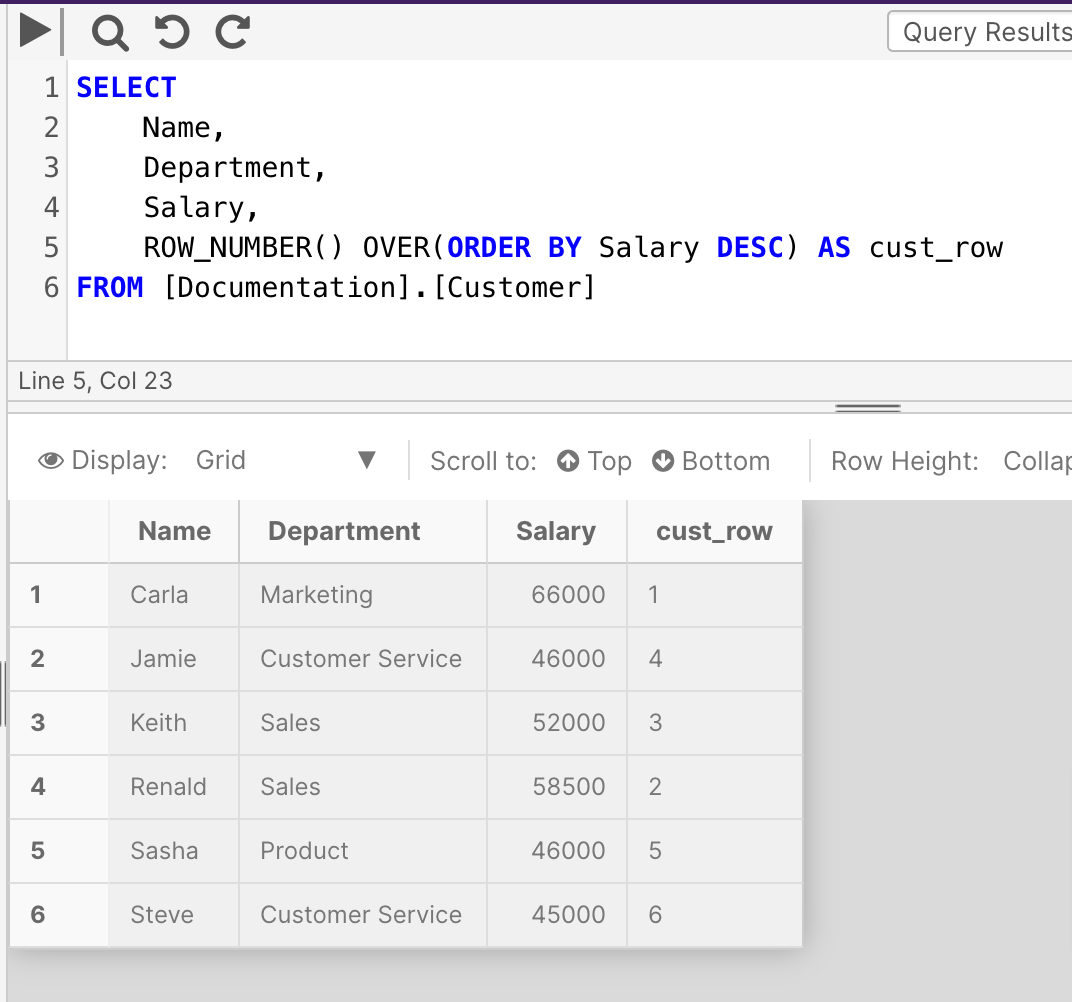
ROW_NUMBER numbers the output of a result set. More specifically, returns the sequential number of a row within a partition of a result set, starting at 1 for the first row in each partition.
ROW_NUMBER differs from RANK in that it numbers all rows sequentially (for example 1, 2, 3, 4, 5). RANK provides the same numeric value for ties (for example 1, 2, 2, 4, 5).
Return Type
Bigint
Syntax
ROW_NUMBER() OVER (PARTITION BY column1 ORDER BY sort_column1)
Arguments
| Argument | Description | Example |
|---|---|---|
OVER | Determines the partitioning and ordering of a rowset before the associated window function is applied. See here for further information. | |
PARTITION BY | This optional clause divides the result set into partitions to which the ROW_NUMBER function is applied | |
ORDER BY | Determines the sequence in which the rows are assigned their unique ROW_NUMBER within a specified partition | Salary |
Example
SELECT
    Name,
    Department,
    Salary,
    ROW_NUMBER() OVER(ORDER BY Salary DESC) AS cust_row
FROM [Documentation].[Customer]
OVER
The OVER clause determines the partitioning and ordering of a rowset before the associated window function is applied.
Syntax
OVER ([PARTITION BY columns] [ORDER BY columns])
Arguments
| Argument | Description |
|---|---|
PARTITION BY | This subclause defines the groups into which the rows are divided. |
ORDER BY | This clause defines the order of the records in the window frame. |