Kafka topic
Overview
Apache Kafkais an end-to-end event streaming platform that:
- Publishes (writes) and subscribes to (reads) streams of events from sources like databases, cloud services, and software applications.
- Stores these events durably and reliably for as long as you want.
- Processes and reacts to the event streams in real-time and retrospectively.
Those events are organized and stored in topics. These topics are then partitioned over buckets located on different Kafka brokers.
Event streaming thus ensures a continuous flow and interpretation of data so that the right information is at the right place, at the right time for your key use cases.
The Kafka Topic destination supports batch and real-time syncs.
Destination tab
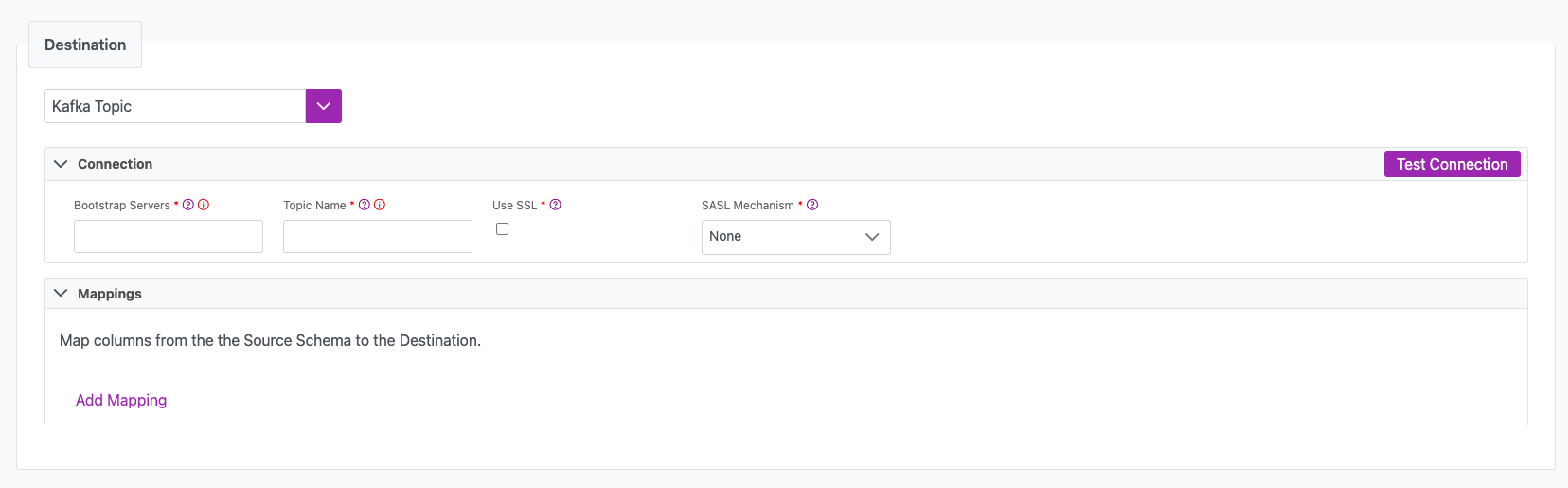
The following table outlines the mandatory and optional parameters you will find on the Destination tab.
- Destination details
- Column Mapping
- Schema Registry
The following parameters will help to define your data sync destination and how it functions.
| Parameter | Description | Example |
|---|---|---|
| Destination | Mandatory. Select your destination from the drop down menu. | Kafka Topic |
| Bootstrap Servers | Mandatory. Bootstrap Servers are a list of host/port pairs to use for establishing the initial connection to the Kafka cluster. This parameter should a CSV list of "broker host" or "host:port" | localhost:9092,another.host:9092 |
| Topic Name | Mandatory. The name of the Kafka Topic that messages will be produced to. | |
| Use SSL | Check this if you want to connect to Kafka over SSL | |
| SASL Mechanism | Mandatory. Select the SASL (Simple Authentication and Security Layer) Mechanism to use for authentication: - None - PLAIN - SCRAM-SHA-256 - SCRAM-SHA-512 - OAUTHBEARER (default) - OAUTHBEARER (oidc) Use None with Use SSL for a connection whose only credential is a client certificate. See Encryption and authentication. | |
| Test Connection | You can use the "Test Connection" button to ensure that your credentials are properly configured to access your destination. If configured correctly, a "Connection Successful" pop-up will appear. If configured incorrectly, a "Connection Failed" pop-up will appear along with a link to the applicable error logs to help you troubleshoot. |
Encryption and authentication
Every certificate and key field is stored encrypted by the platform, and every one of them accepts either PEM content pasted into the field or a reference to a secret (see Certificates and keys from a secret). The certificate fields under Provider Compatibility, for the key hint and for a token endpoint behind mutual TLS, also accept a path to a PEM file on the Connections host. The Encryption (TLS) fields and Private Key (PEM) accept content only: a file path there is read as though it were the PEM itself, and the connection fails.
Encryption (TLS)
| Parameter | Description |
|---|---|
| CA Certificate (PEM) | The CA chain that signs the broker's certificate. Needed when that certificate is not signed by a public CA. |
| Client Certificate (PEM) | The certificate Cinchy presents to the broker. Required for mutual TLS, which is a certificate-only connection with SASL Mechanism set to None. |
| Client Key (PEM) | The private key for that client certificate. Encrypted. The destination has no passphrase setting for this key, so supply it unencrypted (a BEGIN PRIVATE KEY or BEGIN RSA PRIVATE KEY block, not BEGIN ENCRYPTED PRIVATE KEY). |
Authentication, for OAUTHBEARER (oidc)
| Parameter | Description |
|---|---|
| Token Endpoint URL | Mandatory. Where Cinchy requests an access token. Must be HTTPS, except on a loopback address. |
| Client Id | Mandatory. The client ID registered with your identity provider. |
| Client Authentication | Mandatory. How Cinchy proves its identity to the token endpoint: Client Secret sends a shared secret; Private Key (JWT) signs an RFC 7523 section 2.2 client assertion (private_key_jwt), which is what providers mean when they say they issue no client secrets; JWT Bearer Assertion sends a signed assertion as the authorization grant itself (section 2.1), which few providers accept. |
| Client Secret | Required when Client Authentication is Client Secret. Encrypted. |
| Private Key (PEM) | Required when Client Authentication is Private Key (JWT) or JWT Bearer Assertion. The key that signs the assertion. Encrypted. |
| Signing Algorithm | Defaults to RS256. The RS, PS and ES families are available under Private Key (JWT), where Cinchy signs the assertion; financial-grade providers reject RS256 and require PS256 or ES256. Under JWT Bearer Assertion the choice is RS256 or ES256. |
| Scope | The scope requested from the token endpoint, if your provider requires one. |
| Extensions | SASL extensions sent to the broker with the token, as comma-separated key=value pairs. |
| Assertion Claims | The assertion's iss, sub, aud, expiry, not-before and whether to include jti. The defaults are what OIDC requires, with iss and sub set to the client ID and aud to the token endpoint, so override them only where your provider documents something else. |
| Provider Compatibility | Settings only some providers ask for: the key hint that identifies your registered public key (kid, or a certificate thumbprint in the x5t or x5t#S256 header), extra assertion claims, extra token-request parameters and headers, and a client certificate for a token endpoint that is itself behind mutual TLS. A standards-conformant provider needs none of them. |
A provider holding more than one registered public key needs a hint to know which one verifies the
assertion, and many providers start requiring one at your first key rotation rather than at
registration. Use the header your provider's own documentation names. Setting a kid a provider
cannot resolve fails outright, so leave it blank unless the provider publishes that key ID.
Certificates and keys from a secret
Rather than pasting a certificate or key into the connection, you can keep it in the Cinchy Secrets table, including a secret whose value lives in AWS Secrets Manager or Azure Key Vault through the External Secrets Manager. This works for every field in the tables above, including Client Certificate (PEM), Client Key (PEM) and CA Certificate (PEM).
- Store the certificate or key in the Secrets table, one secret per value. For an external secret, the value in AWS or Azure must be in one of the formats the platform can read.
- In the Connections UI, open Info > Variables, add a variable of type Secret, and pick
the secret. Add one variable per secret, for example
clientCertificateandclientPrivateKey. - In the destination field, enter the variable name with an
@prefix and nothing else, for example@clientCertificatein Client Certificate (PEM) and@clientPrivateKeyin Client Key (PEM). - Select Test Connection. The test resolves the variables before it connects, so a formatting problem in the stored secret shows up here rather than in the first job.
The value the secret resolves to must be exactly what you would otherwise paste into the field:
the full PEM block, -----BEGIN ...----- and -----END ...----- lines included, with a real line
break after the header line, between the base64 lines and before the footer line. A value whose line
breaks were turned into spaces, or into the two characters \n, is rejected by the Kafka client
as not being in PEM format.
A variable reference is replaced wherever its name appears in the field, including as the start of
a longer name. Give each variable a name that is not the beginning of another one: with variables
named clientKey and clientKeyPassphrase, the reference @clientKeyPassphrase is partly
replaced by the value of clientKey.
Rotating a certificate
Because the connection reads the secret rather than holding a copy, rotating a certificate means updating the secret, in the Secrets table or in AWS or Azure. You do not edit the connection. When the new value takes effect depends on how the sync runs:
- Batch sync: each job reads the secret when it starts, so the next job uses the new value.
- Real-time sync: the Connections worker reads the secret when it starts processing the sync and keeps the Kafka connection it opened with it. The new value takes effect after the worker restarts or the data sync configuration is saved again.
Update the secret while the old certificate is still valid, so the broker accepts the connection throughout the change.
The Column Mappingsection is where you define which source columns you want to sync to which destination columns. You can repeat the values for multiple columns.
The names you specify in your "Target Column" value will turn into attributes in a JSON payload that will be constructed and pushed to Kafka. The name of this target column can be whatever you choose, but we recommend maintaining your naming convention across columns for simplicity.
| Parameter | Description | Example |
|---|---|---|
| Source Column | Mandatory. The name of your column as it appears in the source. | Name |
| Target Column | Mandatory. The name of your column as it appears in the destination. | Name |
Kafka Schema Registry is supported in Cinchy v5.13.1+.
It provides a centralized repository for managing and validating schemas for topic message data, and for serialization and deserialization of the data over the network.
Considerations
-
Review the documentation here for steps on how to configure topics to work with Schema Registry.
-
Schema Registry is not supported in syncs that use a Dynamic Topic. For real-time syncs, messages will be logged to the Execution Errors table. For batch syncs, the job will fail with a
404: Schema not foundexception. -
This functionality supports JSON schema. It does not support other types such as Avro, Protobuf, or Thrift.
-
If schema validation is configured in your Destination but is not configured in Kafka, the job will fail with an Error
404: Schema not foundexception. -
Schema auto-registration is disabled. If a corresponding schema for a given payload is not found in schema registry, it won't be automatically registered and will subsequently throw an error.
Mapping
The following table shows how Cinchy data types are mapped to JSON schema data types in Kafka.
| Cinchy type | JSON schema type |
|---|---|
| Number | Number |
| Text | String |
| Bool | Boolean |
| Date | String (with 'format' field) |
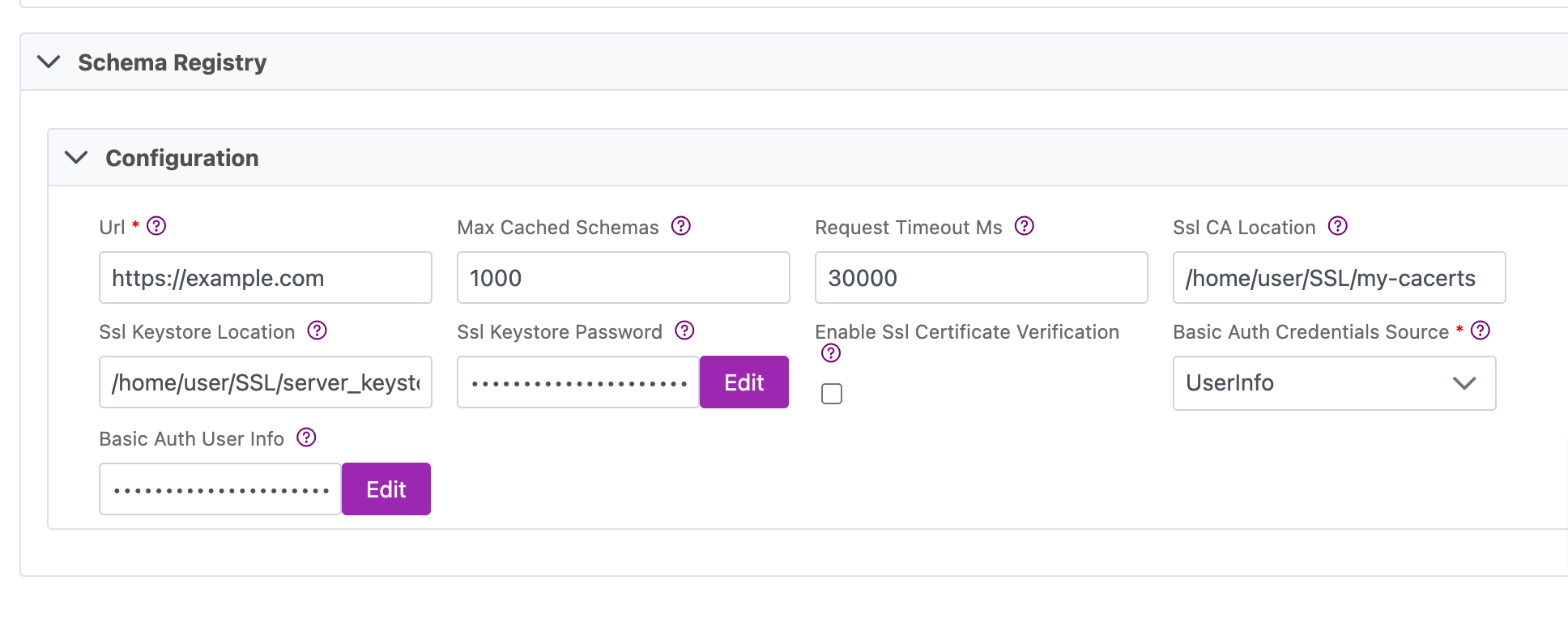
Connections Parameters
| Parameter | Description | Example |
|---|---|---|
| Url | Mandatory. The URL of the Schema Registry server. | <https://example.com> |
| Max Cached Schemas | Specifies the maximum number of schemas the client should cache locally (for efficiency). If left blank, the default is 1000 | 1000 |
| Request Timeout Ms | Specifies the timeout for requests to Schema Registry. default: 30000 | 30000 |
| Ssl CA Location | File or directory path to CA certificate(s) for verifying the schema registry's key. | /home/user/SSL/my-cacerts |
| Ssl Keystore Location | Path to client's keystore (PKCS#12) used for authentication. | /home/user/SSL/server_keystore |
| Ssl Keystore Password | Client's keystore (PKCS#12) password. This value is encrypted by the platform. | /home/user/SSL/server_keystore_password |
| Enable Ssl Certificate Verification | Enable/Disable SSL server certificate verification. Only use in contained test/dev environments. | Disabled by default. |
| Basic Auth User Info | Specifies the Kafka configuration property schema.registry.basic.auth.credentials.source which provides basic authentication. - UserInfo: Credentials are specified via the schema.registry.basic.auth.user.info config property in the form username:password. If schema.registry.basic.auth.user.info is not set, authentication is disabled. - SaslInherit: Credentials are specified via the sasl.username and sasl.password configuration properties. | |
| Basic Auth Credentials Source | Mandatory when using UserInfo authentication. Basic Auth credentials specified in the form of username:password. This value is encrypted by the platform. | admin:p@$$w0rd |
| SASL Username | Username for SASL Authentication. | admin |
| SASL Password | Password for the above username. This value is encrypted by the platform. | p@$$w0rd |
Next steps
- Define yourSync Actions.
- Add in your Post Sync Scripts, if required.
- Define your Permissions.
- If you are running a real-time sync, set up your Listener Config and enable it to begin your sync.
- If you are running a batch sync, click Jobs > Start a Job to begin your sync.
Appendix A
Configuring a Dynamic Topic
Cinchy v5.10 added the ability to use a '@COLUMN' custom formula to enable a dynamic parameterized Kafka Topic when syncing into a Kafka destination.
To use this functionality, follow the below instructions.
- Define which table and column you want to use for your dynamic topic. In this example, the table is
[Product].[Tasks]and the column is "Quarter". - Create a data sync using a Cinchy Table source and a Kafka Topic destination.
- Ensure that the column defined in step 1 is loaded into your Schema.
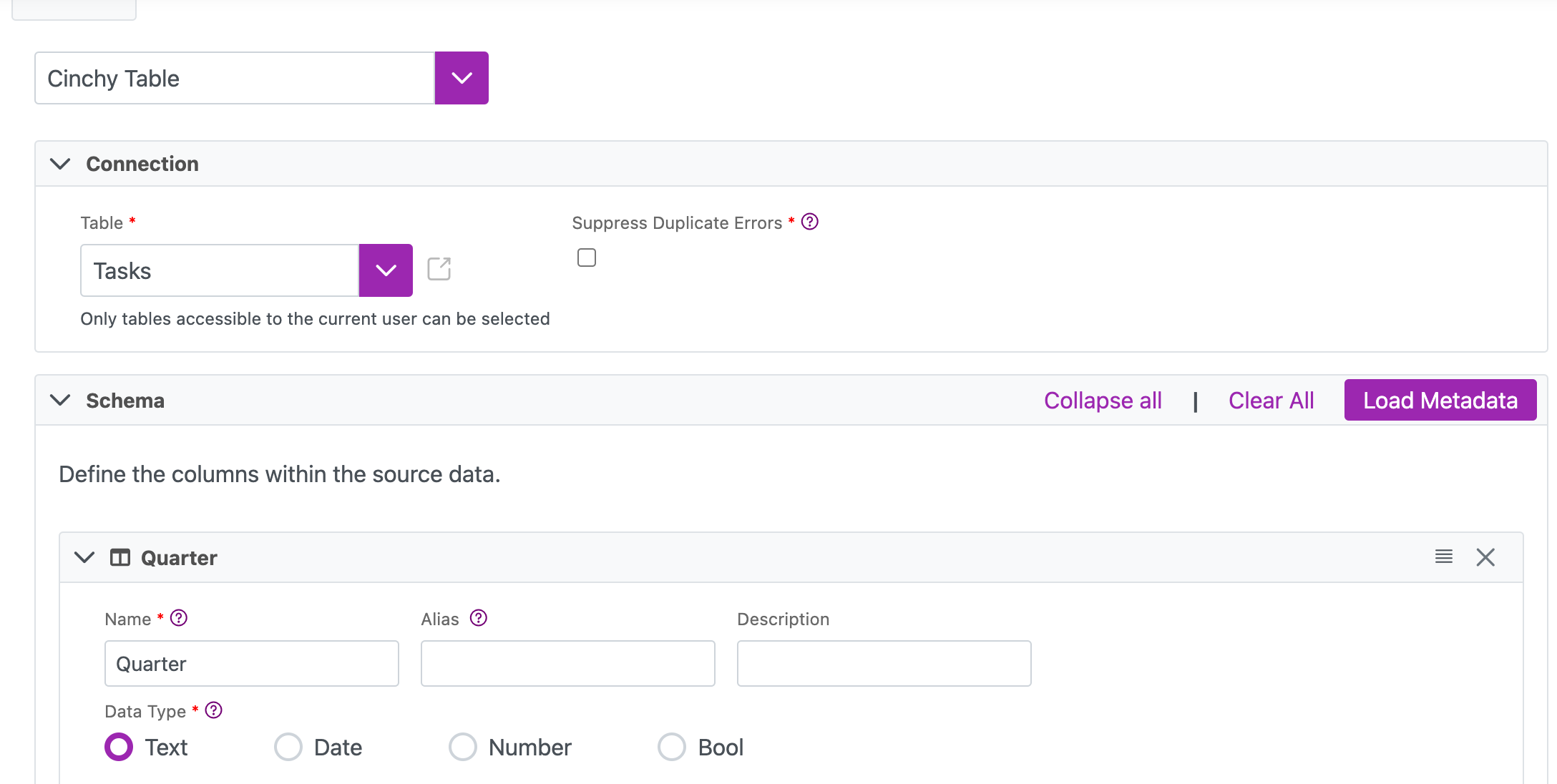
- Ensure that the column defined in step 1 is loaded into your Schema.
- In the 'Topic' field of the Kafka destination, insert "@COLUMN('<column-name>')". In this example, the formula would be @COLUMN('Quarter').
