Salesforce object (Bulk API)
Overview
Salesforce is a cloud-based CRM software designed for service, marketing, and sales.
Salesforce objects are database tables that permit you to store data that's specific to an organization. Salesforce objects are of two types:
- Standard Objects: Standard objects are the kind of objects that are provided by salesforce.com such as users, contracts, reports, dashboards, etc.
- Custom Objects: Custom objects are those objects that are created by users. They supply information that's unique and essential to their organization. Custom objects are the heart of any application and provide a structure for sharing data.
The Salesforce Object (Bulk API) source supports batch syncs.
Info tab
You can find the parameters in the Info tab below (Image 1).
Values
| Parameter | Description | Example |
|---|---|---|
| Title | Mandatory. Input a name for your data sync | to Cinchy |
| Description | Optional. Add in a description for your sync. There is a 500 character limit in this field. | |
| Variables | Optional. Review our documentation on Variables herefor more information about this field. | |
| Permissions | Data syncs are role based access systems where you can give specific groups read, write, execute, and/or all of the above with admin access. Inputting at least an Admin Group is mandatory. |
Source tab
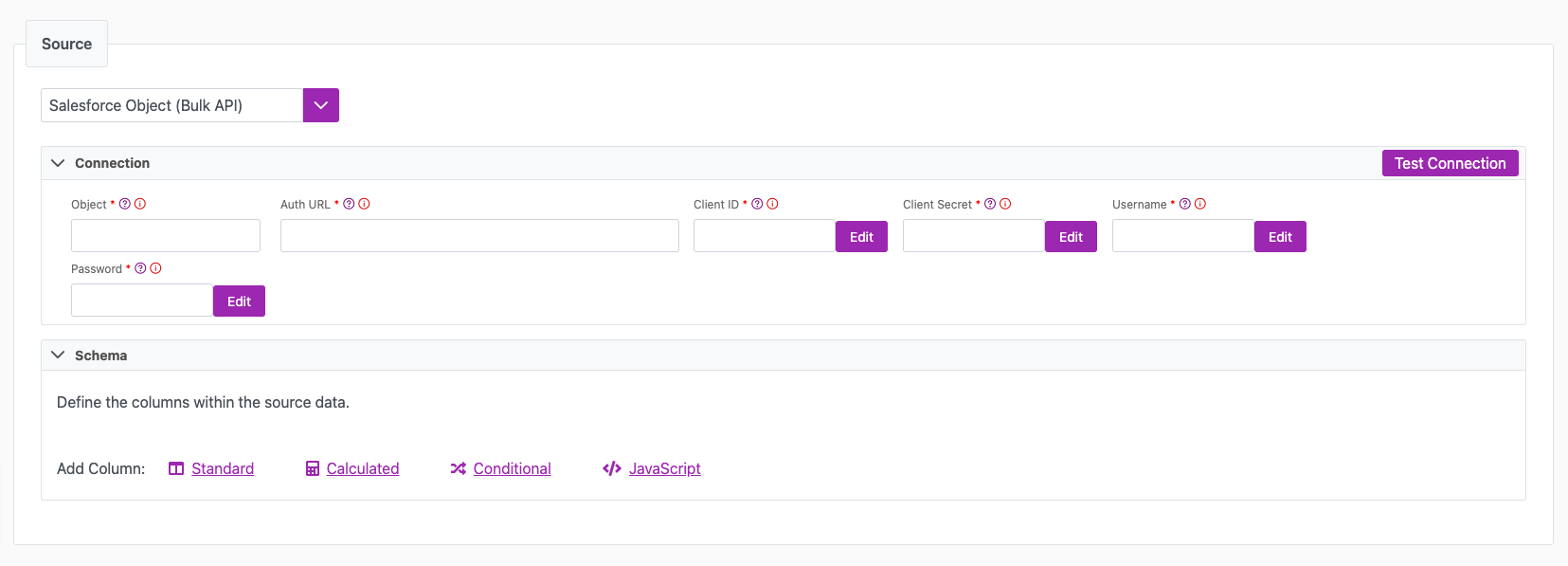
The following table outlines the mandatory and optional parameters you will find on the Source tab (Image 2).
- Source Details
- Schema
- Filter
The following parameters will help to define your data sync source and how it functions.
| Parameter | Description | Example |
|---|---|---|
| Source | Mandatory. Select your source from the drop-down menu. | Salesforce Object (Bulk API) |
| Object | Mandatory. Name of your Salesforce Object. | |
| Auth URL | Mandatory. The URL that issues your Salesforce token. With the Client Credentials grant this must be your org's My Domain host. With the Username-Password grant you can also use https://login.salesforce.com/services/oauth2/token or, for sandboxes, https://test.salesforce.com/services/oauth2/token. | https://mydomain.my.salesforce.com/services/oauth2/token |
| Client ID | Mandatory. Encrypted Client ID (consumer key) of your Salesforce External Client App or Connected App. The Connections UI encrypts this value for you. | |
| Client Secret | Mandatory. Encrypted Client Secret (consumer secret) of the same app. The Connections UI encrypts this value for you. | |
| Grant Type | Mandatory. The OAuth 2.0 flow used to obtain the token. Username-Password (default) signs in as a Salesforce user. Client Credentials authenticates the app itself through an External Client App with the client credentials flow enabled and a Run As user. Salesforce no longer allows new Connected Apps and is retiring the Username-Password flow, so use Client Credentials for new integrations. | Client Credentials |
| Username | Mandatory for Username-Password. Encrypted username of the Salesforce user. Not shown for Client Credentials. | |
| Password | Mandatory for Username-Password. Encrypted password of that user, with the security token appended if your org requires it. Not shown for Client Credentials. | |
| Test Connection | Use "Test Connection" to validate credentials. Pop-ups for successful or failed connections will appear. |
Salesforce serves the Client Credentials flow only from your org's My Domain host, for example https://mydomain.my.salesforce.com/services/oauth2/token. It rejects requests sent to login.salesforce.com or test.salesforce.com with invalid_grant: request not supported on this domain. Sandboxes have their own My Domain host. The External Client App must have the client credentials flow enabled with a Run As user, and every record the sync creates or changes is attributed to that user.
The Schema section is where you define which source columns you want to sync in your connection. You can repeat the values for multiple columns.
| Parameter | Description | Example |
|---|---|---|
| Name | Mandatory. The name of your column as it appears in the source. | Name |
| Alias | Optional. You may choose to use an alias on your column so that it has a different name in the data sync. | |
| Data Type | Mandatory. The data type of the column values. | Text |
| Description | Optional. You may choose to add a description to your column. |
Select Show Advanced for more options for the Schema section.
| Parameter | Description | Example |
|---|---|---|
| Mandatory |
| |
| Validate Data |
| |
| Trim Whitespace | Optional if data type = text. For Text data types, you can choose whether to trim the whitespace._ | |
| Max Length | Optional if data type = text. You can input a numerical value in this field that represents the maximum length of the data that can be synced in your column. If the value is exceeded, the row will be rejected (you can find this error in the Execution Log). |
You can choose to add in a Transformation > String Replacement by inputting the following:
| Parameter | Description | Example |
|---|---|---|
| Pattern | Mandatory if using a Transformation. The pattern for your string replacement. | |
| Replacement | What you want to replace your pattern with. |
You have the option to add a source filter to your data sync. Please review the documentation here for more information on source filters.
Next steps
- Configure your Destination.
- Define your Sync Actions.
- Add in your Post Sync Scripts, if required.
- Select Jobs > Start a Job to begin your sync.