5.21 Release notes
Upgrade guides
For general upgrade-script guidance, see the Cinchy upgrade utility.
v5.21 does not add any new services. However, two optional services were introduced in recent releases — if you are upgrading from a version earlier than these, you may want to add them as part of this upgrade:
- Cinchy MCP Server (new in v5.19) — see MCP Deployment (Kubernetes) or MCP Deployment (IIS).
- Cinchy Email Notification Service (new in v5.20) — see Notification Service Setup (Kubernetes) or Email Notification Service Deployment (IIS).
5.21.1 Patch notes
Cinchy v5.21.1 was released on July 9, 2026.
Security
- Fixed critical vulnerabilities.
Cinchy v5.21 was released on June 30, 2026.
The v5.21 upgrade applies a model upgrade that provisions new platform metadata, including:
- New system functions for quote-aware CSV splitting (
dbo.SplitQuoteAwareCsv) used by the new multi-valueResolveLinksupport in CQLUPDATE/SET. - New localized literals powering the Query Execution Plan viewer.
The upgrade runs automatically on first start of the new version. Plan your upgrade window accordingly.
New capabilities
Query Execution Plan viewer
Cinchy v5.21 adds a built-in Query Execution Plan viewer to the query editor. It lets you understand how a CQL query executes — without leaving Cinchy or reading raw physical SQL.
How it works
Key capabilities
- Estimated and actual execution plans for a CQL query, rendered with a visual operator tree.
- Friendly (Cinchy) names throughout — physical
Tbl#/Col_#identifiers are translated back to your domain, table, and column names, so the plan and its SQL read in Cinchy terms.
Backend support
- SQL Server
- PostgreSQL
Full support for estimated and actual execution plans.
Execution plans are supported, with friendly-name translation that correctly preserves the domain on double-quoted PostgreSQL identifiers.
OAuth 2.0 Token Exchange (RFC 8693) for the Cinchy IdP
The Cinchy Identity Provider now supports the OAuth 2.0 Token Exchange grant (RFC 8693). This lets a client exchange one token for another within Cinchy's identity service, enabling delegation and impersonation flows for integrations and downstream services.
This capability was added to support Perimind, Cinchy's new product.
Enhancements
Cinchy Query Language (CQL)
Multi-value links in UPDATE/SET
ResolveLink already resolved multiple comma-delimited display values for multi-select link columns in INSERT; this brings UPDATE/SET to parity, including quote-aware splitting so a lookup value may itself contain a comma.
Example — set a multi-select link column to two linked rows in an UPDATE:
UPDATE t
SET [Members] = ResolveLink('Alice,Bob', 'Name')
FROM [HR].[Teams] t
WHERE t.[Team Name] = 'Platform';
this focus-table alias
Table access control filters can now reference the focus table with a this alias. This makes entitlement expressions on tables with complex structures easier to write and more portable, since the filter no longer has to hard-code the table's name.
Example — an access-control filter that restricts visible rows by referencing the focus table:
this.[Department] = 'Finance'
parent('Column') host-row reference
A link column's Link Filter can now use parent('Column') to read a value from the host row — the row currently being edited. This makes it easy to build dependent (cascading) dropdowns, where the options offered in one link column are narrowed by the value of another column on the same row, without writing any custom code.
A common example is a Country → Region selector: once a row's Country is set, the Region dropdown should only offer regions that belong to that country.
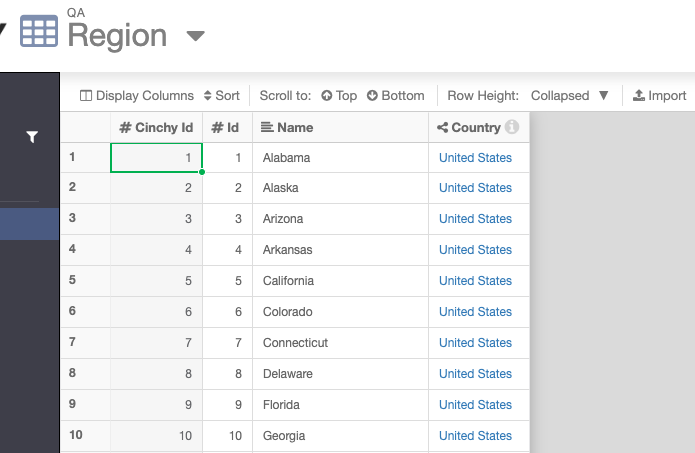
1. The linked reference table
The Region link column points at a reference table (QA \ Region). Each region row carries a Country link, so every region "knows" which country it belongs to:
2. Configure the Link Filter with parent()
On the Region link column (Data Type Link, Linked Table QA \ Region, Linked Column Name), open Show Advanced and set the Link Filter:
[Country] = parent('Country')
Here [Country] is the Country column on the linked Region table, and parent('Country') resolves to the Country value of the host row being edited. Only regions whose country matches the host row's country pass the filter.
![The Region link column configuration with Link Filter set to [Country] = parent('Country')](/assets/images/parent-link-filter-config-8a3c40965496e22e86eb7d37e822c921.png)
3. Result — the dropdown cascades by country
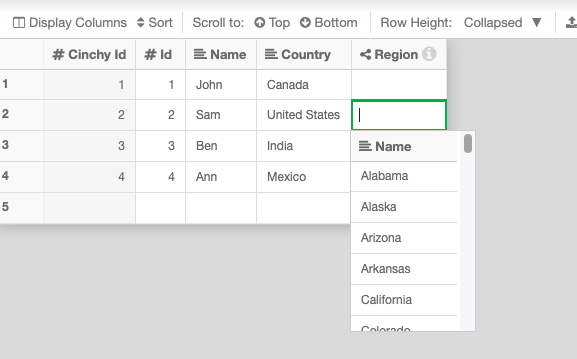
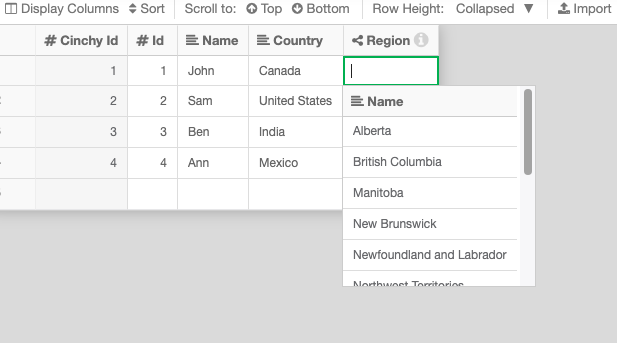
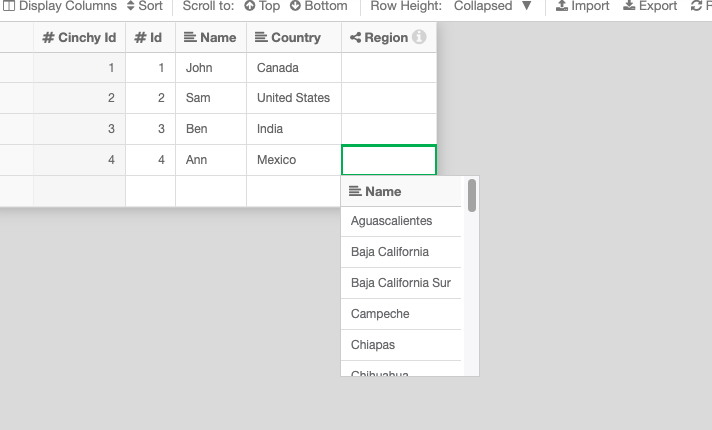
When you edit the Region cell, the dropdown now shows only the regions for that row's Country:
Host row Country | Region dropdown shows |
|---|---|
| United States | US states (Alabama, Alaska, Arizona, …) |
| Canada | Canadian provinces (Alberta, British Columbia, Manitoba, …) |
| Mexico | Mexican states (Aguascalientes, Baja California, Campeche, …) |
Query editor & Manage Data
Single query execution
Running a query in the editor now executes it once (with an on-demand row count) instead of three times — reducing load and latency for every run.
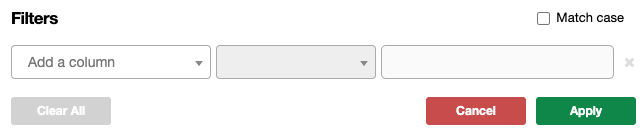
Case-sensitive filter toggle
Manage Data now offers an exact-match (case-sensitive) filter toggle.
Example — with the toggle on, filtering a Name column for Cinchy no longer matches cinchy or CINCHY.
Friendly names in native error messages
Physical SQL identifiers in database error messages are now translated to friendly Cinchy names, so errors are readable in Cinchy terms.
Example — a constraint or type error that previously surfaced Tbl1234.Col_56 now reads in domain/table/column terms, e.g. [HR].[Employees].[Salary].
Connections
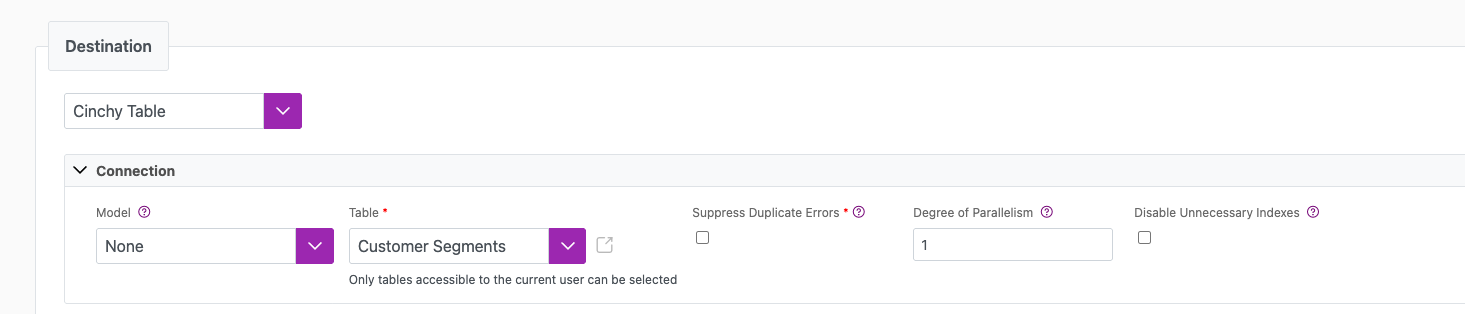
Disable unnecessary indexes during batch syncs
A new option lets you disable non-essential indexes for the duration of a batch sync, improving throughput on large loads.
Example — enable the option on a data sync configuration's batch/performance settings before running a large load; indexes are disabled for the sync and re-enabled afterward.
Observability Dashboard
Permission-based access
The Observability Dashboard (introduced in v5.20) is no longer restricted to Cinchy Administrators. Any user with View All Columns access to the nine tables it depends on can now open it: the five Observability tables (Sync Groups, Sync Group Members, SLA Definitions, Health Snapshots, Baseline Metrics) plus Data Sync Configurations, Execution Log, Listener Config, and Event Listener State. Cinchy Administrators retain access. The dashboard also moved from /admin/observability to /observability.
Example — a non-admin user granted View All Columns on the nine dependency tables can open /observability directly.
STRING_SPLIT() in CQL
CQL now supports the STRING_SPLIT() table-valued function, letting you split a delimited string into a set of rows directly in a query — useful for parameter lists, multi-value inputs, and joining against delimited data.
Example — split a comma-delimited string into rows:
SELECT s.value
FROM STRING_SPLIT('apple,banana,cherry', ',') AS s
ORDER BY s.value;
Pass a third argument of 1 to return an ordinal column preserving the original position:
SELECT s.value, s.ordinal
FROM STRING_SPLIT('a,b,c', ',', 1) AS s
ORDER BY s.ordinal;
Columnstore indexes & table partitioning
Cinchy v5.21 adds columnstore and partitioning support across CQL DDL and the model loader. You can now define columnstore indexes and partitioned tables through Cinchy's model, with the platform handling creation and avoiding needless rebuilds. This release also fixes a columnstore timeout and an unnecessary-rebuild issue.
Example — create a nonclustered columnstore index over two columns:
CREATE NONCLUSTERED COLUMNSTORE INDEX IX_Sales_Columnstore
ON [Sales].[Transactions] ([Amount], [Region]);
Fixes
Platform
- Fixed CQL
HAVINGclause columns not being translated to physical names. - Rejected terminal
SELECT ... INTOstatements in the query editor and fixed an additive "Executing" timer. - Fixed the query editor scrolling to the top when dragging a table into a long query.
- Re-challenge SSO login on an OIDC correlation failure instead of erroring.
- Fixed the Between filter for the French language.
- Fixed the Event Listener build for IIS.
Connections
- Fixed a Db2 polling offset datatype error (
CLI0111E/22003) in the Event Listener and added an optional command timeout.
Cinchy MCP Server
execute_syncno longer flags Secret- or formula-backed parameters as missing in its required-parameter check.